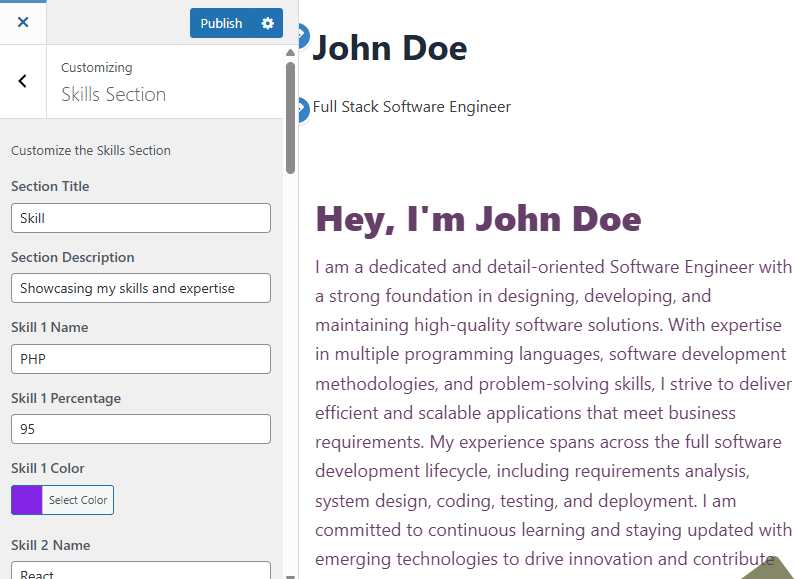
You can add up to 10 skill sets to visually showcase your expertise. Each skill includes a name, proficiency percentage, and color bar.
1️⃣ Add Section Title
This is the heading of your Skills section.
- Example:
Skills,Expertise, orWhat I Do
2️⃣ Add Section Description
A brief description that appears under the section title.
- Example:
Showcasing my skills and expertise - Tip: Keep it short and relevant to your professional abilities.
3️⃣ Skill Inputs (Up to 10 Skills)
For each skill, you’ll be asked to input the following:
🏷️ Skill Name
- Example:
PHP,JavaScript,React,Python, etc. - Tip: Use commonly recognized tools, languages, or platforms.
📊 Skill Percentage
- Example:
95,80,70 - Range:
0to100 - Meaning: This indicates your self-assessed proficiency in that skill.
🎨 Skill Color
- Use the built-in Color Picker to assign a unique color for the progress bar associated with that skill.
- Tip: Choose different colors for better visual differentiation.
✅ Sample Entry for Skill 1
- Skill 1 Name:
PHP - Skill 1 Percentage:
95 - Skill 1 Color: (Select from color bar)
🔟 Repeat the same steps for Skill 2 to Skill 10 as needed.
Unused skills (left blank or 0%) will not appear on the front end.
📝 Notes:
- Use accurate percentages to reflect your expertise realistically.
- You don’t have to fill all 10 slots—only add the skills you want to showcase.
- Colors can enhance visual impact, so choose them wisely.